How to answer customer enquiries at night without hiring anyone
Auto-replies, booking links and AI assistants that turn an 11pm message into a morning booking. What it costs, how long set-up takes, what to avoid.
 Sol Wright
In short
You do not need a night shift. An honest auto-reply, a booking link and an AI assistant that knows your prices will hold a lead until morning. Set-up takes one afternoon and costs under £50 a month, and most of it is free.
- Speed wins. A Harvard Business Review study found firms that replied within an hour were nearly seven times more likely to have a real conversation.
- An auto-reply that says when you will answer and offers a booking link does most of the work.
- Start with your own opening hours and prices. An assistant that guesses does more harm than silence.
- Check every morning. Ten minutes reading what the tools said overnight keeps them honest.
Why the 11pm message matters
Most people look for a florist, a plumber or a dog groomer after work, on the sofa, with their phone. If they message you at 11pm and hear nothing until you finish your first job at ten the next morning, many of them have already messaged someone else. You did not lose the job because you were bad. You lost it because you were asleep.
The numbers back this up. A study published in the Harvard Business Review looked at how quickly firms answered web enquiries. The ones that replied within an hour were nearly seven times more likely to have a real conversation with the customer than the ones that waited even an hour longer. After a day, the lead was close to worthless.
You cannot answer at 11pm every night. But you can make sure the customer gets three things straight away: a reply, a reason to wait, and a way to book. That is what this guide sets up.
What you need
- A phone with WhatsApp on it, or a business page on Facebook or Instagram, or a website contact form. Whatever people already use to reach you.
- Your opening hours, your prices or price ranges, and your service area, written down in one place. A note on your phone is fine.
- Twenty minutes for the auto-reply, an hour for the booking link, and an afternoon if you want the AI assistant too.
- Nothing to install on a computer. Everything here runs on your phone.
Step by step
Step 1: an auto-reply that does a job
An auto-reply is a message your phone sends for you when you are not there. Most people set one that says "Thanks for your message, we will get back to you." That does nothing. Nobody knows when "we will get back to you" means, so they message the next person on the list.
Write one that answers the three things the customer is worrying about: did you get it, when will you reply, and what can they do right now. Something like this:
Thanks for messaging Bloom. We are closed for the night and reply between 8am and 6pm. If you want a date held, book a quick call here: [your booking link]. For prices, most bouquets are £35 to £80 and wedding flowers start at £400.
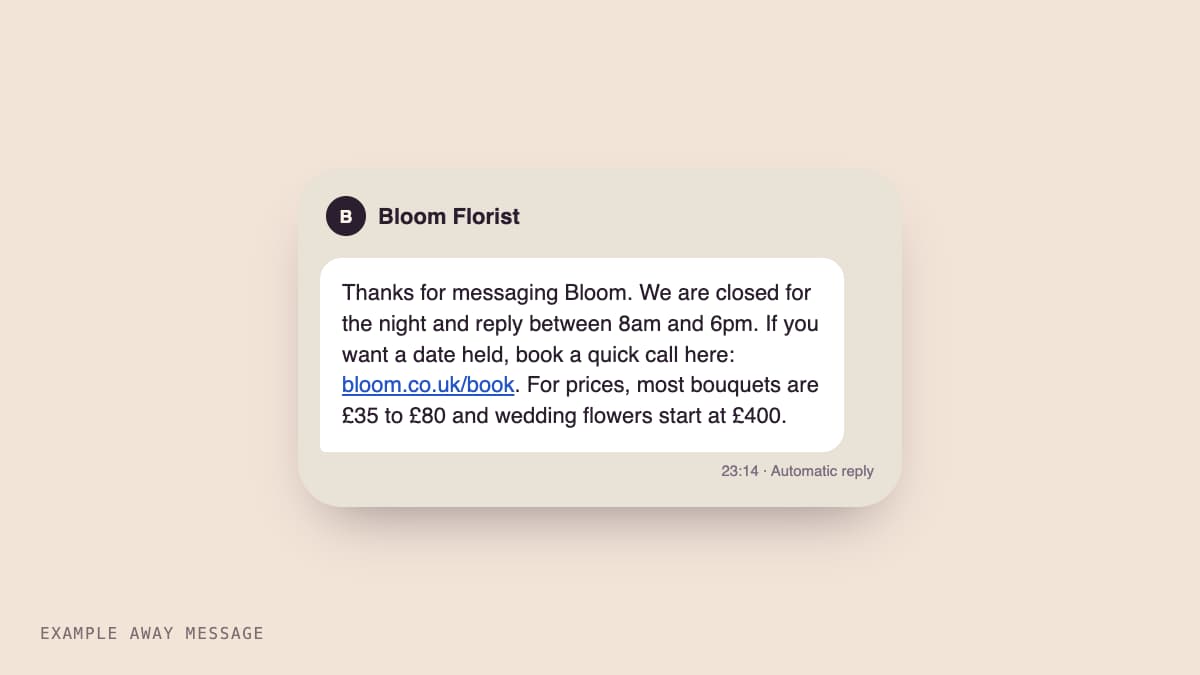
In the WhatsApp Business app this lives under Business tools, then Away message. Set it to send outside your business hours. On Facebook and Instagram it is called Instant reply or Away message under your page's inbox settings. On a website form, most form tools have an auto-responder email you can edit. Set-up takes twenty minutes. Cost: nothing.
Step 2: put a booking link in it
A booking link is a web page where the customer picks a time from your calendar. When it sits inside your auto-reply, a question at 11pm becomes an appointment at 11:02pm, and you wake up to a booking instead of a message you have to chase.
Cal.com and Calendly both have free plans that connect to a Google or Apple calendar, block out times you are busy, and send both of you a reminder. Make one event, call it something plain like "Quick chat about your order, 15 minutes", and only open the hours you actually want calls. Paste the link into the auto-reply from step 1 and into your Google Business Profile.
If you do not do calls and just want the job booked, most trades and salons use a simple booking tool instead. The idea is the same: one link, one click, a slot held.
This takes about an hour the first time, mostly deciding your hours. Cost: nothing on the free plans.
Step 3: add an assistant that knows your prices
The first two steps hold the lead. An AI assistant answers it. This is a small program that reads the message and replies the way you would, using only the facts you have given it: your services, prices, area, hours, and how to book.
There are many tools that do this for WhatsApp, Instagram and website chat. Whichever you pick, do these three things:
- Give it your written list of facts from "What you need" and nothing else. Tell it, in plain words, to say "I am not sure, a person will confirm in the morning" for anything not on the list.
- Make it say it is an assistant in its first line. Honest bots keep customers. Bots pretending to be you lose them the moment they slip.
- Make it offer the booking link whenever someone asks about a date, a quote or availability.
Then test it. Message your own business from a friend's phone with the five questions you get most, and read what it says. Fix the facts until every answer is one you would have sent yourself.
Set-up is an afternoon. Cost: usually £20 to £50 a month for a small business, and some tools have a free tier for a few hundred messages.
What it costs and how long it takes
| Piece | Time | Cost |
|---|---|---|
| Auto-reply with hours, prices and a link | 20 minutes | Free |
| Booking link connected to your calendar | 1 hour | Free plan |
| AI assistant that quotes only your facts | One afternoon | £0 to £50 a month |
Ongoing: ten minutes each morning to read what came in overnight and correct anything the assistant got wrong. That is also the best list of what your customers actually want to know, so keep the notes.
If you would rather not run any of this yourself, it is one of the four jobs Humanleap runs for small businesses, with a person checking the replies every day. See what we run.
Mistakes to avoid
A vague auto-reply. "We will get back to you" makes people leave. Say when, and give them something to do now.
Opening every hour on the booking link. You will get a call at 7am on your day off. Open only the hours you want to be talking to customers.
Letting the assistant guess. An assistant that invents a price or a date costs you more than silence would. Written facts only, and "a person will confirm" for everything else.
Never reading the overnight chats. The tools are only as good as the last time you checked them. Ten minutes a morning, especially in the first two weeks.
Hiding that it is a bot. Customers forgive a helpful assistant that says what it is. They do not forgive being fooled.
Start with step 1 tonight. It takes twenty minutes, costs nothing, and you will see the difference in tomorrow morning's messages.
Questions people ask
Will customers know they are talking to a bot?
Tell them in the first line. People do not mind a bot that is honest and useful, and they can see you are a small business. They mind a bot that pretends to be you and gets things wrong.
Do I need a new phone number for WhatsApp Business?
No. The WhatsApp Business app can take over the number you already use, and you can move it back later. If you want work messages kept separate from family ones, a cheap second SIM does the job.
What if the assistant gives someone the wrong price?
Set it up so it only quotes prices you have written down, and tells people a person will confirm. Check the overnight chats each morning for the first fortnight and fix anything it got wrong the same day.
Sources

Sol Wright is cofounder of Humanleap. He works with UK small-business owners — salons, clinics and trades — to keep socials, website, SEO and enquiry replies running without a big agency retainer. He writes the guides in plain English so an owner can decide what to fix today, and what to hand off.
Want this done for you?
Humanleap runs your socials, website, search and enquiries for £500 a month. Real people check the work.
New guides, by email.
One email when a new guide goes up. No newsletter chatter, no selling. Unsubscribe with one click.
The sign-up form is off while we set things up. Follow the RSS feed instead, or email hello@humanleap.com. RSS feed